

Latest Version
KDE
Security
Linux
Free
org.kde.kdf
Report a Problem
More About KDiskFree
Imagine you are mid-way through rendering a large video file or compiling a complex software package on your Linux system, only to be stopped dead in your tracks by a "disk space full" error. Keeping a close eye on your storage capacity is vital for system stability, and that is where the KDiskFree disk space analyzer becomes an essential addition to your utility toolkit.
What is KDiskFree?
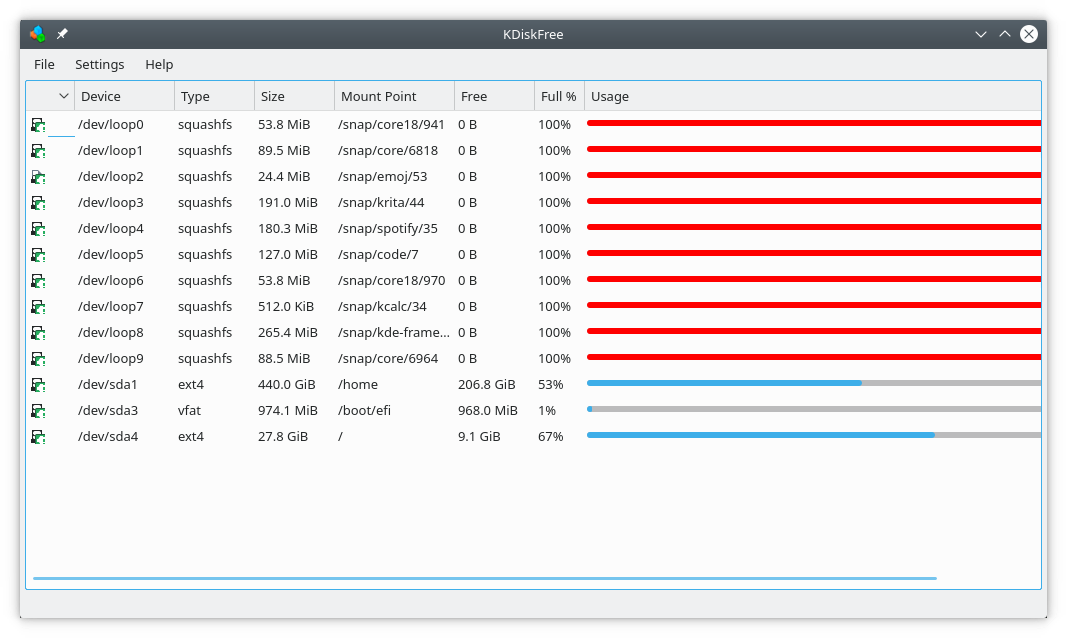
Developed by the trusted KDE community, KDiskFree is a lightweight, intuitive system utility designed specifically for the Linux platform. It provides a clean graphical interface that demystifies your storage media, giving you an instant overview of every connected drive, partition, and mount point without needing to remember complex terminal commands like df -h.
Key Features of the KDiskFree Disk Space Analyzer
- Real-Time Capacity Tracking: Instantly view the total capacity, percentage of used space, and actual remaining free gigabytes across all your drives.
- Interactive Drive Management: Mount and unmount hard drive partitions, CD-ROMs, floppy disks, or USB drives with a simple click.
- File Manager Integration: Open any mounted partition directly in your system's default file manager to quickly clean up clutter.
- Detailed Device Insights: Access critical technical details including file system type, mount points, and device paths.
Who is This Utility For?
Whether you are a Linux desktop enthusiast managing multiple storage drives or a system administrator who prefers a visual representation of system partitions, this tool simplifies storage oversight. Its straightforward presentation makes it highly accessible for beginners, while its quick mount/unmount capabilities offer excellent convenience for advanced users.
An Essential Tool for Storage Maintenance
Instead of guessing which partition is running out of room, the KDiskFree disk space analyzer visualizes your storage status clearly. It acts as an early warning system, allowing you to manage your file systems proactively before low disk space impacts your system's performance.
If you are ready to take control of your Linux storage partitions, we highly recommend checking out this excellent utility. You can learn more and find installation options on the official Flathub store page.
Rate the App
User Reviews
Popular Apps










Editor's Choice